Gym App Built for Progressive Overload: What That Actually Means
By Boston Naviaux, founder of Lift Dungeon · Published May 20, 2026 · Updated October 17, 2026 · 8 min read
A gym app built for progressive overload picks your next session from your logged history instead of only storing it. For every exercise it chooses the next weight, notices a stall and adjusts. A logbook records what you did. A progression engine decides what you do next, so you never have to guess.
Almost every gym app on the App Store says it supports progressive overload. Many use a definition of the phrase that doesn't match what an actual lifter needs.
What follows is a walk through what a gym app built specifically for progressive overload has to do, and why most generic workout trackers fall short. We're going to use Lift Dungeon, the lifting RPG, as the concrete example because we built it and we can tell you exactly what's under the hood, but the criteria apply to any honest progressive-overload app. (Lift Dungeon wraps a real rule-based progression engine in a game: you pick a class, level a pixel-art character with XP, and fight every exercise as a hand-animated monster in Dungeon Mode. The engine is the part that matters for this article.)
What kinds of gym apps are there?
There are two kinds: logbooks, which store what you did, and progression engines, which decide what you do next.
- Logbooks. You tell the app what you did. It stores the data and renders it as a chart. The app is passive: it never tells you what to do next, it just remembers what you already did.
- Progression engines. The app picks your next session for you based on what you logged before. Weights, reps, and rest are decided by the app, not by you. You execute; the app does the thinking.
A gym app for progressive overload has to be the second kind. If the app isn't selecting your next session's weights, you are. And if you're picking weights, you're not progressively overloading. You're guessing.
What does a progressive-overload app have to do?
A progressive-overload app has to do six jobs at minimum: pick the next weight, detect a stall, swap lifts that stall, progress each exercise on its own, read rep quality, and show the trajectory.
1. Pick the next weight for every set
Not by program template ("week 3, day 2 of cycle 4"). By exercise history. If you bench-pressed 185 × 8 last Tuesday and you're benching again today, the app needs to know, and pick 185 × 9 or 190 × 8, depending on which variable you're pushing this block. Either route can work: in an eight-week trial of 43 trained lifters, adding reps at a fixed load and adding load at a fixed rep range both looked viable for building muscle and strength.
Most logbook apps don't even attempt this. The ones that do usually pick from a fixed table ("if you got 8 reps, add 5 lbs") without checking whether the rep quality was real. The benchmark is relative, not fixed: the American College of Sports Medicine's position stand recommends a 2 to 10% load increase once you can do the current load for one to two reps over your target. A real progression engine looks at how you finished (clean reps versus grinders, partial range, missed sets) and adjusts accordingly.
2. Detect a stall
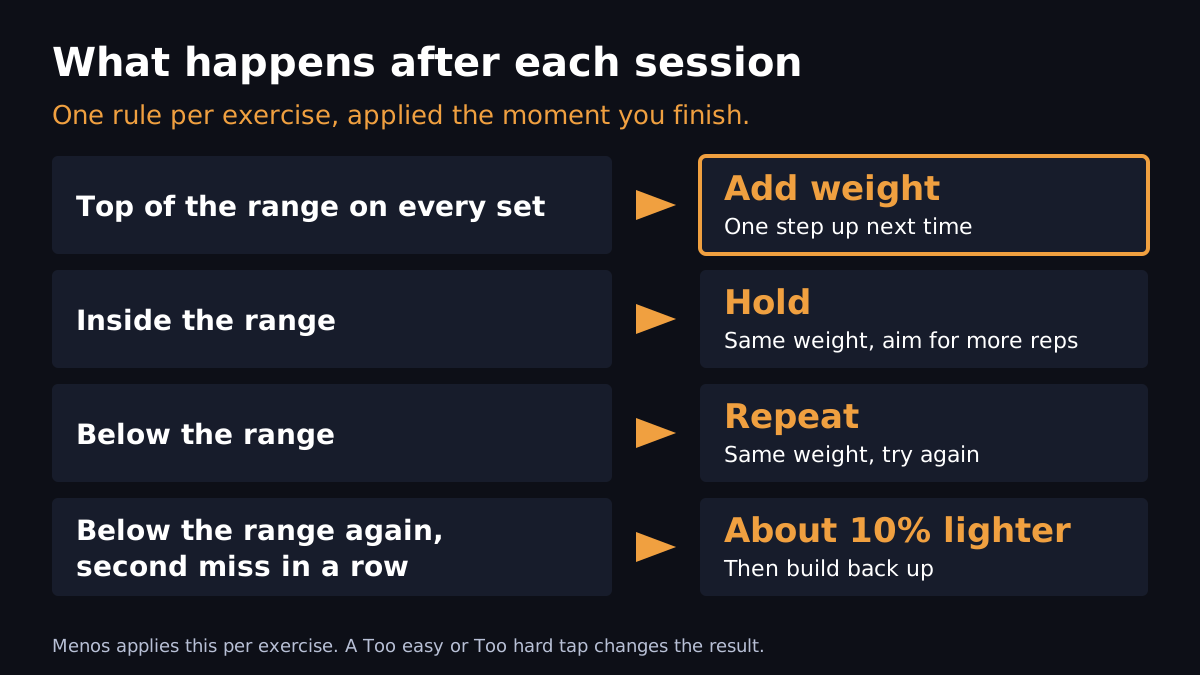
You've worked the same weight for three sessions and your reps aren't going up. A logbook app will keep showing you the same prescription. A progression engine notices, holds the weight one more session, and if you stall again, deloads or swaps the exercise.
The threshold matters. Too aggressive and the app deloads you every time you have a bad day. Too patient and you grind for a month on a weight that's eating your shoulders. Lift Dungeon holds the weight when you land inside your rep range, repeats it after a miss, and deloads about 10% after a second miss in a row. Tag a lift Too hard and miss reps, and it deloads right away.
3. Swap exercises that aren't working
Sometimes a lift just doesn't progress for you. Overhead press is the classic: some people gain 5 lbs a month, others can't move it for a year. A real progression engine has a fallback list per movement pattern and can suggest a swap when an exercise has stalled twice through deload.
Swap suggestions are the feature most apps skip entirely, because it requires a movement-pattern taxonomy under the hood. Lift Dungeon leaves the call to you: swap any exercise that isn't working, and if you swap the same one for preference 3 times, the swap becomes permanent. It never swaps a lift on its own.
4. Apply progressive overload per exercise, not per program
Program-level progression is the failure mode in even good apps. Many tools track program-level progression ("you've added X total volume this block") but apply the same delta to every lift. That's not how strength works. Your squat might be adding 5 lbs a session while your bench is adding 1 lb. Your deadlift might be on a maintenance hold while your rows are PR'ing every week.
5. Track rep quality, not just rep count
"6 reps" can mean two things: you stopped at six because the program said six, or you stopped at six because the seventh would have collapsed. The progression decision is completely different. A clean six means push the weight next session. A near-failure six means repeat or back off.
A gym app that only stores a number is missing half the data. Lift Dungeon asks you. Tag a lift Too easy, Just right or Too hard: Too easy jumps the weight at least two steps, and Too hard holds it, or deloads it right away if you also missed reps. Your reps against the target do the rest.
6. Show you the trajectory, not just the data
A chart of your bench-press numbers over six months is data. "Your bench is on pace to hit 225 in 4 weeks if you keep this trend" is a trajectory. A progressive-overload gym app should compute the second one, because that's what tells you whether the program is working without you having to do mental math.
The bookkeeping problem (why most lifters give up)
Progressive overload, on paper, is the simplest concept in strength training: add a little work each session. The reason it's hard isn't the concept. It's the bookkeeping.
To do progressive overload by hand, you need to know, for every exercise, every working set:
- What weight you used last session.
- How many reps you got, on each set.
- How the last set felt.
- Whether you've stalled at this weight before, and how recently.
- How many sessions ago you deloaded.
Multiply by 8–12 exercises per program and you're maintaining a spreadsheet that you have to actually use during your warm-up. Almost nobody does this for more than three weeks.
A gym app built for progressive overload absorbs all of that. You walk in, the next session is loaded, you lift, you tap to log, the engine writes back to history. The bookkeeping happens silently. This is the only reason apps in this category exist: humans are bad at the spreadsheet part and pay good money to never see it again. (More on the actual mechanics: how to track progressive overload.)
The Lift Dungeon-shaped answer
Lift Dungeon is the lifting RPG built on a real progressive-overload engine, because that's the problem we set out to solve. Concretely:
- The progression engine is rule-based and runs per exercise: double progression, a deload after a second miss in a row, and a deload week at the end of every 6-week block.
- The first session of a big lift ends with an ALL OUT set that calibrates your starting weight.
- A Recommended Block built from your goal, days, equipment and injuries, or Custom Splits for your own, with PR tracking built in.
- The whole thing is wrapped in a game: pick a class (Warrior, Berserker, Ranger, Adventurer), level a pixel-art character with XP, and fight every exercise as a hand-animated monster or boss in Dungeon Mode.
- Co-op parties let you train live with friends with shared kills, duels score you pound for pound, and the opt-in Hall of Lifters ranks the room.
- One tap to log a set. The active-workout screen never feels like a spreadsheet.
None of this is novel in isolation. The unusual part is that Lift Dungeon picked progressive overload as the only problem and built a whole game around it, instead of bolting "progressive overload mode" onto a general-purpose tracker.
The gym app built for progressive overload.
Lift Dungeon picks your next session and applies progression automatically. Free on iPhone, with optional Pro ($9.99/month or $59.99/year) and Ultimate ($14.99/month or $89.99/year) subscriptions for longer history, bigger parties and extras.
Download free